Recursos PRO
O Diagrammix3 está disponível como um download gratuito, com recursos PRO opcionais que desbloqueiam capacidades avançadas de diagramação.
Gratuito vs. PRO
| Recurso | Gratuito | PRO |
|---|---|---|
| Formas, conectores, fluxogramas | ✓ | ✓ |
| Todos os 11 pacotes de notação | ✓ | ✓ |
| Tabelas, camadas, grupos | ✓ | ✓ |
| Layout automático (todos os algoritmos) | ✓ | ✓ |
| Notas adesivas (com imagens) | ✓ | ✓ |
| Modelos personalizados | ✓ | ✓ |
| Ferramenta Copiar Estilo | ✓ | ✓ |
| Exportar PNG, JPEG (PDF via Imprimir) | ✓ | ✓ |
| Combinar formas, elementos reutilizáveis, pranchetas, Repetir… | ✓ | ✓ |
| Diagramas de Classes UML | — | ✓ |
| Diagramas de Sequência UML | — | ✓ |
| Importação e Exportação de SVG | — | ✓ |
| Importação e Exportação do Visio | — | ✓ |
| Importação e Exportação do Mermaid | — | ✓ |
| Mapas Mentais | — | ✓ |
| Integração com IA (Servidor MCP) | — | ✓ |
| Autoestilos e Estilos Personalizados | — | ✓ |
| Biblioteca de ícones completa | — | ✓ |
| Diagramas ASCII | — | ✓ |
Recursos Exclusivos do PRO
Autoestilos
Transforme a aparência dos seus diagramas com temas de tela de um clique:
- Esboço — aparência orgânica desenhada à mão, com preenchimentos de hachura e linhas onduladas
- Quadrinhos — contornos ousados e grossos, com curvas exageradas
- Projeto — estilo de desenho técnico, com preenchimentos de hachura cruzada e linhas precisas
- Ajuste com precisão os parâmetros de cada estilo (rugosidade, curvatura, espessura do traço, padrões de preenchimento) no inspetor Estilo do Tema
- Alterne entre estilos instantaneamente — o conteúdo do seu diagrama permanece o mesmo
Mapas Mentais
Capture e organize ideias em um modo dedicado de mapas mentais:
- Expanda mapas pelo teclado (
Tabpara um filho,Returnpara um irmão) - Oito estruturas (Mapa Mental, Lógico, Organograma, Árvore, Catálogo, Espinha de Peixe, Linha do Tempo, Linha do Tempo Vertical)
- Temas integrados, ícones e formas por nó, molduras de grupo e resumos
- Exporte para Markdown, OPML e XMind; crie um mapa a partir de Markdown com Editar → Colar Markdown como Mapa Mental
- Veja o guia de Mapas Mentais
Estilos Personalizados
Salve seus próprios estilos de diagrama reutilizáveis junto com os temas de tela integrados:
- Duplique um estilo integrado ou comece do zero, e depois ajuste cada parâmetro com precisão
- Aplique seus estilos a qualquer documento pelo menu Autoestilo
- Recrie uma aparência a partir de uma imagem de referência via MCP
- Veja o guia de Estilos Personalizados
Diagramas ASCII
Crie e exporte diagramas baseados em texto usando caracteres ASCII:
- Tipo de página dedicado a diagramas ASCII, com uma tela em grade de caracteres
- Desenhe caixas, linhas, setas e texto usando caracteres ASCII/Unicode
- Exporte diagramas como texto simples (.txt) para uso em comentários de código, documentação e terminais
- Escolha entre conjuntos de caracteres ASCII e Unicode
Diagramas de Classes UML
Crie diagramas de classes UML profissionais com:
- Formas de classe com seções de atributos e métodos
- Conectores de herança, associação e dependência
- Notação e estilização UML adequadas
- Layout inteligente para hierarquias de classes
Diagramas de Sequência UML
Construa diagramas de sequência interativos com:
- Linhas de vida de participantes
- Mensagens síncronas e assíncronas
- Barras de ativação
- Autochamadas e mensagens de retorno
- Fragmentos combinados (laços, alternativas)
Importação e Exportação de SVG
Trabalhe com gráficos vetoriais escaláveis:
- Importe arquivos SVG para sua biblioteca de clipart com Visualizar → Gerenciar Clipart… → Importar SVG...
- Exporte seus diagramas como SVG para publicação na web
- Preserva caminhos, texto e estilização
- Compatível com editores vetoriais como Illustrator, Figma e Inkscape
Importação e Exportação do Mermaid
Integre-se com diagramação baseada em texto:
- Pré-visualize e valide o Mermaid antes que ele chegue à tela
- Continue editando diagramas importados em notação Mermaid com o editor de origem
</> - Copie um diagrama de volta como texto Mermaid para uso em Markdown, GitHub e documentação
- Suporta fluxogramas, diagramas de sequência e mais
Integração com IA (Servidor MCP)
Deixe que assistentes de IA construam diagramas para você:
- O servidor MCP integrado funciona com Claude, Codex e outros assistentes de IA
- Descreva o que você precisa — a IA cria símbolos, conectores e layouts na tela
- A IA lê seu documento atual e pode modificar elementos existentes
- Criação em lote de diagramas completos em uma única etapa de desfazer
- Veja o guia de Integração com IA para instruções de configuração
Comprando o PRO
Para desbloquear os recursos PRO:
- Vá para Diagrammix → Configurações… (
Cmd+,) e abra a aba PRO, depois clique em Desbloquear PRO — ou simplesmente clique em qualquer recurso marcado com um ícone de cadeado - Revise as opções disponíveis
- Complete sua compra pela Mac App Store
Sua compra é um pagamento único, sem necessidade de assinatura.
Restaurando Compras
Se você já comprou o PRO anteriormente em outro dispositivo ou depois de reinstalar:
- Vá para Diagrammix → Configurações… e abra a aba PRO (ou abra a folha de compra do PRO a partir de qualquer recurso bloqueado)
- Clique em Restaurar Compras e faça login com seu Apple ID se solicitado
- Seus recursos PRO serão restaurados automaticamente
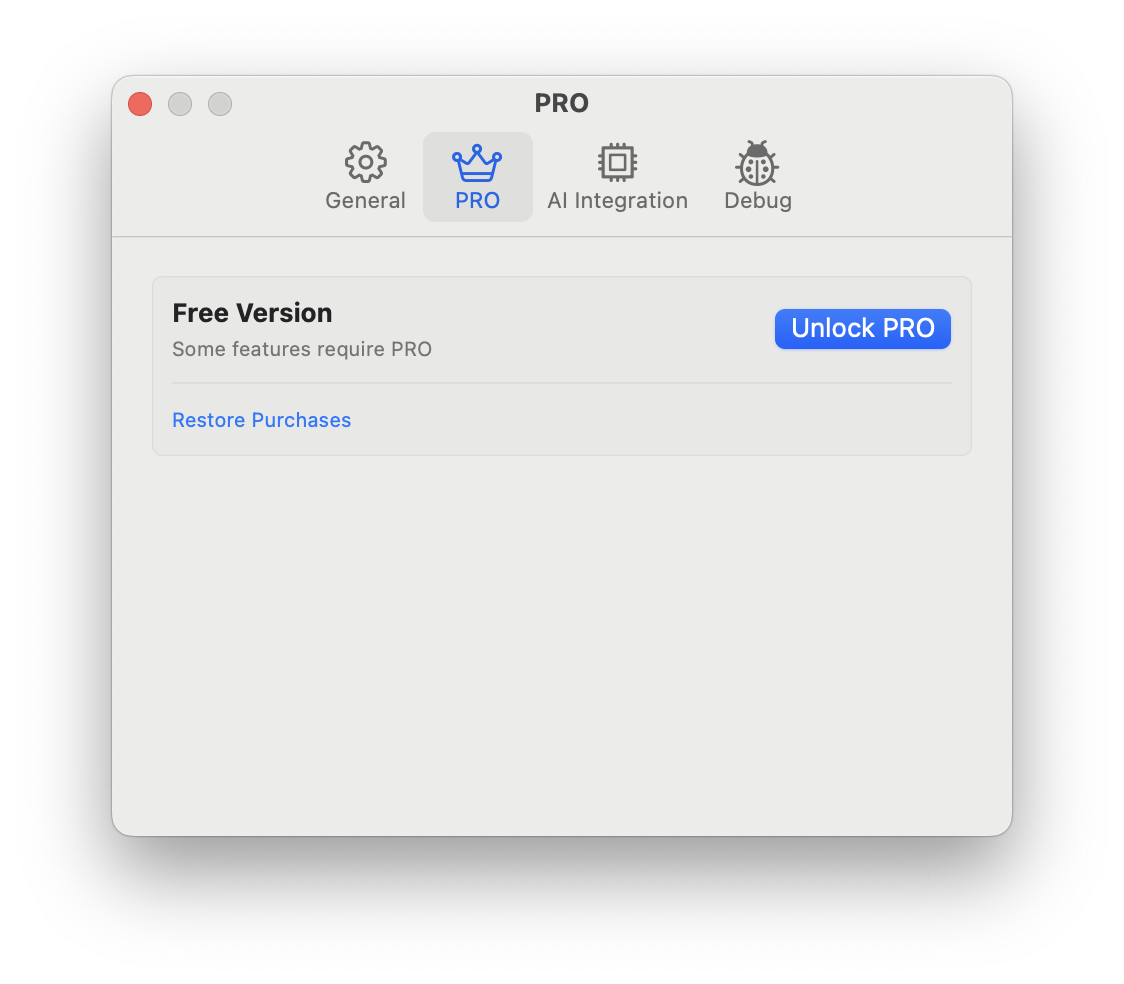
Verificando Seu Status
Abra Diagrammix → Configurações… → PRO. Ele mostra Versão PRO quando todos os recursos estão desbloqueados, ou Versão Gratuita caso contrário. Na versão gratuita, comandos e tipos de página PRO mostram um ícone de cadeado.
Compartilhamento Familiar
Se você faz parte de um grupo de Compartilhamento Familiar da Apple, sua compra do PRO pode estar disponível para outros membros da família, dependendo das suas configurações de Compartilhamento Familiar.