PRO Features
Diagrammix3 is available as a free download with optional PRO features that unlock advanced diagramming capabilities.
Free vs PRO
| Feature | Free | PRO |
|---|---|---|
| Shapes, connectors, flowcharts | ✓ | ✓ |
| All 11 notation packs | ✓ | ✓ |
| Tables, layers, groups | ✓ | ✓ |
| Auto-layout (all algorithms) | ✓ | ✓ |
| Sticky notes (with images) | ✓ | ✓ |
| Custom templates | ✓ | ✓ |
| Copy Style tool | ✓ | ✓ |
| Export PNG, JPEG (PDF via Print) | ✓ | ✓ |
| Combine shapes, reusable elements, artboards, Repeat… | ✓ | ✓ |
| UML Class Diagrams | — | ✓ |
| UML Sequence Diagrams | — | ✓ |
| SVG Import & Export | — | ✓ |
| Visio Import & Export | — | ✓ |
| Mermaid Import & Export | — | ✓ |
| Mind Maps | — | ✓ |
| AI Integration (MCP Server) | — | ✓ |
| Autostyles & Custom Styles | — | ✓ |
| Full icon library | — | ✓ |
| ASCII Diagrams | — | ✓ |
PRO-Only Features
Autostyles
Transform the look of your diagrams with one-click canvas themes:
- Sketch — hand-drawn, organic look with hachure fills and wobbly lines
- Comic — bold, thick outlines with exaggerated curves
- Blueprint — technical drawing style with crosshatch fills and precise lines
- Fine-tune each style's parameters (roughness, bowing, stroke thickness, fill patterns) in the Theme Style inspector
- Switch between styles instantly — your diagram content stays the same
Mind Maps
Capture and organize ideas in a dedicated mind-mapping mode:
- Grow maps from the keyboard (
Tabfor a child,Returnfor a sibling) - Eight structures (Mind Map, Logical, Org Chart, Tree, Catalog, Fishbone, Timeline, Vertical Timeline)
- Built-in themes, per-node icons and shapes, group frames, and summaries
- Export to Markdown, OPML, and XMind; create a map from Markdown with Edit → Paste Markdown as Mindmap
- See the Mind Maps guide
Custom Styles
Save your own reusable diagram styles alongside the built-in canvas themes:
- Duplicate a built-in style or start fresh, then fine-tune every parameter
- Apply your styles to any document from the Autostyle menu
- Recreate a look from a reference image over MCP
- See the Custom Styles guide
ASCII Diagrams
Create and export text-based diagrams using ASCII characters:
- Dedicated ASCII diagram page type with a character grid canvas
- Draw boxes, lines, arrows, and text using ASCII/Unicode characters
- Export diagrams as plain text (.txt) for use in code comments, documentation, and terminals
- Choose between ASCII and Unicode character sets
UML Class Diagrams
Create professional UML class diagrams with:
- Class shapes with attributes and methods sections
- Inheritance, association, and dependency connectors
- Proper UML notation and styling
- Smart layout for class hierarchies
UML Sequence Diagrams
Build interactive sequence diagrams with:
- Participant lifelines
- Synchronous and asynchronous messages
- Activation bars
- Self-calls and return messages
- Combined fragments (loops, alternatives)
SVG Import & Export
Work with scalable vector graphics:
- Import SVG files into your clipart library with View → Manage Clipart… → Import SVG...
- Export your diagrams as SVG for web publishing
- Preserves paths, text, and styling
- Compatible with vector editors like Illustrator, Figma, and Inkscape
Mermaid Import & Export
Integrate with text-based diagramming:
- Preview and validate Mermaid before it lands on the canvas
- Keep editing imported diagrams in Mermaid notation with the
</>source editor - Copy a diagram back as Mermaid text for use in Markdown, GitHub, and documentation
- Supports flowcharts, sequence diagrams, and more
AI Integration (MCP Server)
Let AI assistants build diagrams for you:
- Built-in MCP server works with Claude, Codex, and other AI assistants
- Describe what you need — AI creates symbols, connectors, and layouts on the canvas
- AI reads your current document and can modify existing elements
- Batch creation of complete diagrams in a single undo step
- See the AI Integration guide for setup instructions
Purchasing PRO
To unlock PRO features:
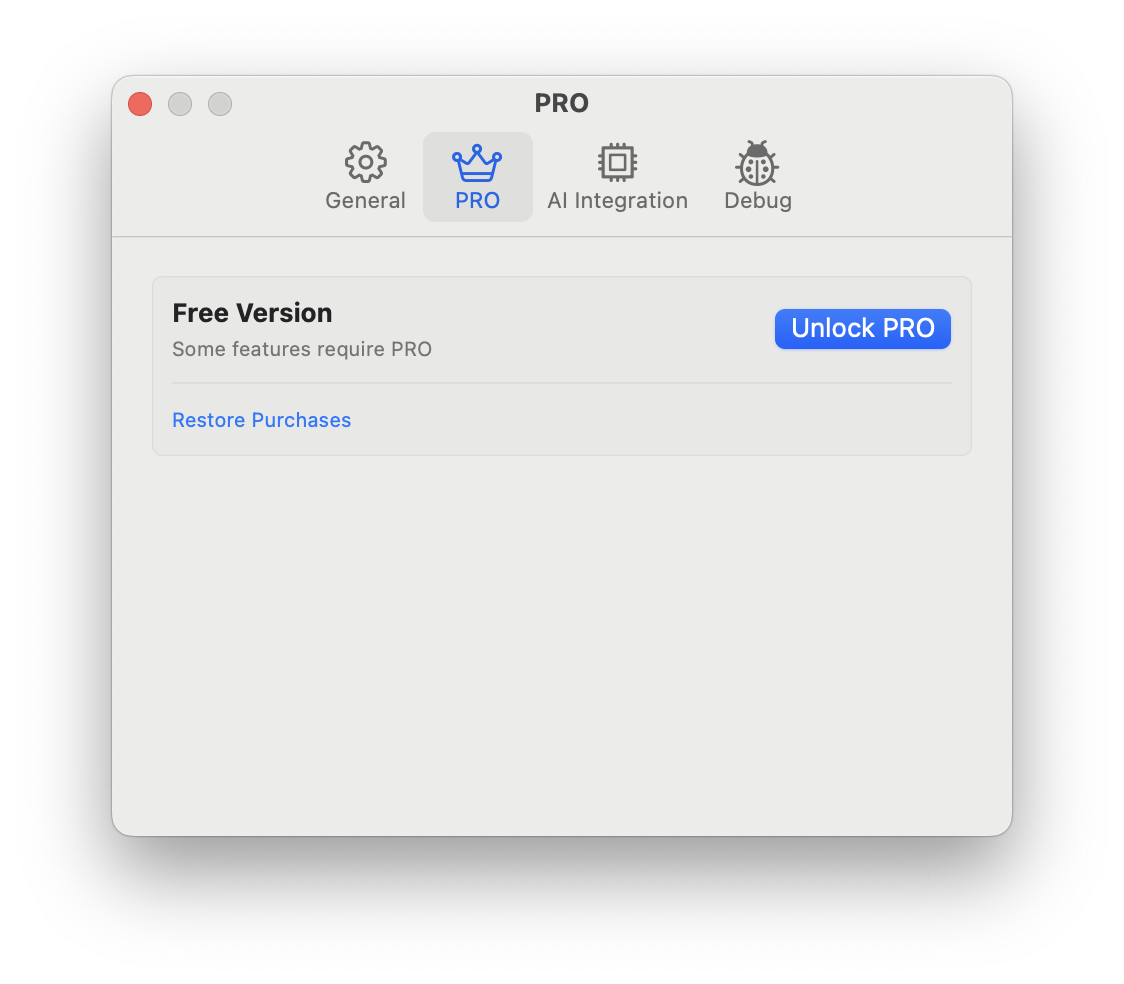
- Go to Diagrammix → Settings… (
Cmd+,) and open the PRO tab, then click Unlock PRO — or simply click any feature marked with a lock icon - Review the available options
- Complete your purchase through the Mac App Store
Your purchase is a one-time payment with no subscription required.
Restoring Purchases
If you've previously purchased PRO on another device or after reinstalling:
- Go to Diagrammix → Settings… and open the PRO tab (or open the PRO purchase sheet from any locked feature)
- Click Restore Purchases and sign in with your Apple ID if prompted
- Your PRO features will be restored automatically
Checking Your Status
Open Diagrammix → Settings… → PRO. It shows PRO Version when all features are unlocked, or Free Version otherwise. In the free version, PRO commands and page types show a lock icon.
Family Sharing
If you're part of an Apple Family Sharing group, your PRO purchase may be available to other family members depending on your Family Sharing settings.